On this page
☰
案例一:切边
问题描述:扫描仪扫描到的法律文件,需要切边,去掉边缘空白。
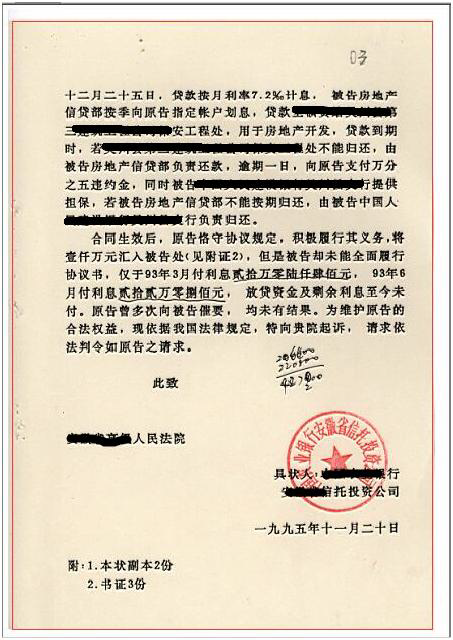
解决思路:通过Canny边缘检测+轮廓发现找到最大外接矩形实现
代码演示
void FindROI(int, void*)
{
	cvtColor(src1, gray_src, COLOR_BGR2BGRA);
	Mat canny_output;
	Canny(gray_src, canny_output, threshold_value, threshold_value * 2, 3, false);

	vector<vector<Point>> contours;
	vector<Vec4i> hireachy;
	findContours(canny_output, contours, hireachy, RETR_TREE, CHAIN_APPROX_SIMPLE, Point(0, 0));

	int minw = src1.cols * 0.75;
	int minh = src1.rows * 0.75;
	Mat drawImage = Mat::zeros(src1.size(), CV_8UC3);
	RNG rng(12345);
	Rect bbox;
	for (size_t t = 0; t < contours.size(); t++)
	{
		RotatedRect minRect = minAreaRect(contours[t]);
		float degree = abs(minRect.angle);
		printf("current angle : %f\n", degree);
		if (minRect.size.width > minw && minRect.size.height > minh && minRect.size.width < (src.cols - 5))
		{
			Point2f pts[4];
			minRect.points(pts);
			bbox = minRect.boundingRect();
			Scalar color = Scalar(rng.uniform(0, 255), rng.uniform(0, 255), rng.uniform(0, 255));
			for (int i = 0; i < 4; i++)
			{
				line(drawImage, pts[i], pts[(i + 1) % 4], color, 2, 8, 0);
			}

		}
	}
	imshow(output_title, drawImage);
	if (bbox.width > 0 && bbox.height > 0)
	{
		Mat roiImg = src1(bbox);
		imshow("roiImage ", roiImg);
	}

}
void Check_Skew(int, void*)
{
	Mat canny_output;
	cvtColor(src1, gray_src, CV_BGR2GRAY);
	Canny(gray_src, canny_output, threshold_value, threshold_value * 2, 3, false);

	vector<vector<Point>> contours;
	vector<Vec4i> hireachy;
	findContours(canny_output, contours, hireachy, RETR_TREE, CHAIN_APPROX_SIMPLE, Point(0, 0));

	Mat drawImg = Mat::zeros(src1.size(), CV_8UC3);
	float maxw = 0;
	float maxh = 0;
	double degree = 0;

	for (size_t t = 0; t < contours.size(); t++)
	{
		RotatedRect minRect = minAreaRect(contours[t]);
		degree = abs(minRect.angle);
		if (degree > 0)
		{
			maxw = max(maxw, minRect.size.width);
			maxh = max(maxh, minRect.size.height);
		}
	}

	RNG rng(12345);
	for (size_t t = 0; t < contours.size(); t++)
	{
		RotatedRect minRect = minAreaRect(contours[t]);
		if (maxw == minRect.size.width && maxh == minRect.size.height)
		{
			degree = minRect.angle;
			Point2f pts[4];
			minRect.points(pts);
			Scalar color = Scalar(rng.uniform(0, 255), rng.uniform(0, 255), rng.uniform(0, 255));
			for (int i = 0; i < 4; i++)
			{
				line(drawImg, pts[i], pts[(i + 1) % 4], color, 2, 8, 0);
			}
		}
	}
	printf("maxw : %d\n", maxw);
	printf("maxh : %d\n", maxh);
	printf("degree : %d\n", degree);

	imshow(output_title, drawImg);

	Point2f center(src1.cols / 2, src1.rows / 2);
	Mat rotm = getRotationMatrix2D(center, degree, 1.0);
	Mat dst;
	warpAffine(src1, dst, rotm, src1.size(), INTER_LINEAR, 0, Scalar(255, 255, 255));
	imshow("Correct Image", dst);
}
案例二:直线检测
问题描述:寻找英语试卷填空题下的下划线
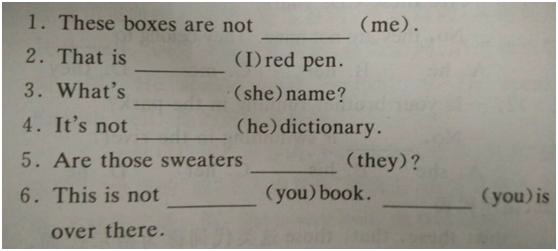
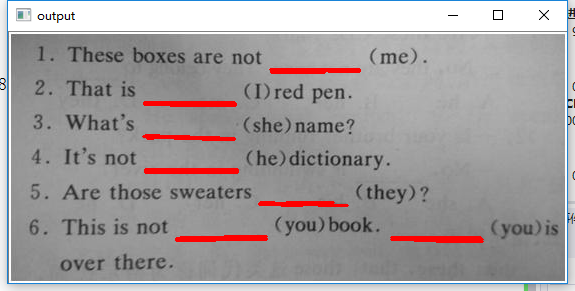
解决思路:通过图像形态学来寻找直线,霍夫获取位置信息与显示
代码演示 错误姿势:
void detectLines(int, void*)
{
	Canny(roiImage, dst, threshold_value, threshold_value * 2, 3, false);
	vector<Vec4i> lines;
	HoughLinesP(dst, lines, 1, CV_PI / 180.0, 30, 30.0, 0);
	cvtColor(dst, dst, COLOR_GRAY2BGR);
	for (size_t t = 0; t < lines.size(); t++)
	{
		Vec4i ln = lines[t];
		line(dst, Point(ln[0], ln[1]), Point(ln[2], ln[3]), Scalar(0, 0, 255), 2, 8, 0);
	}
	imshow("HoughLine", dst);
}
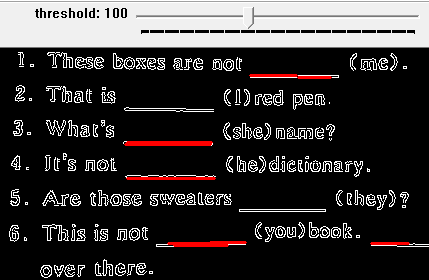
正确姿势:
void morhpologyLine(int, void*)
{
	//Binary Image
	Mat BinaryImage, morhpImage;
	cvtColor(src1, roiImage, CV_BGR2GRAY);
	threshold(roiImage, BinaryImage, 0, 255, THRESH_BINARY | THRESH_OTSU);
	imshow("Binary", BinaryImage);

	//morphology
	Mat kernel = getStructuringElement(MORPH_RECT, Size(30, 1), Point(-1, -1));
	morphologyEx(BinaryImage, morhpImage, MORPH_CLOSE, kernel, Point(-1, -1));
	imshow("morphology result", morhpImage);

	//erode image
	kernel = getStructuringElement(MORPH_RECT, Size(3, 3), Point(-1, -1));
	erode(morhpImage, morhpImage, kernel);
	imshow("morphology lines", morhpImage);

	//hough lines
	vector<Vec4i> lines;
	HoughLinesP(~morhpImage, lines, 1, CV_PI / 180.0, 30, 20.0, 0);
	Mat resultImage = roiImage.clone();
	cvtColor(resultImage, resultImage, COLOR_GRAY2BGR);
	for (size_t t = 0; t < lines.size(); t++)
	{
		Vec4i ln = lines[t];
		line(resultImage, Point(ln[0], ln[1]), Point(ln[2], ln[3]), Scalar(0, 0, 255), 2, 8, 0);
	}
	imshow(output_title, resultImage);
}
注意:THRESH_OTSU和THRESH_TRIANGLE处理的图像只能是8位的,一般来说是灰度图像
案例三:对象提取
问题描述:对图像中的对象进行提取,去掉其他干扰和非目标对象
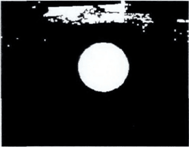
解决思路: 二值分割+形态学处理+纵横比计算
代码演示
	//二值化
	cvtColor(src1, gray_src, CV_BGR2GRAY);
	threshold(gray_src, BinaryImg, 0, 255, THRESH_BINARY | THRESH_OTSU);
	imshow("Binary Image", BinaryImg);

	Mat kernel = getStructuringElement(MORPH_RECT, Size(3, 3), Point(-1, -1));
	morphologyEx(BinaryImg, dst, MORPH_CLOSE, kernel, Point(-1, -1));
	imshow("CLOSE Img", dst);

	kernel = getStructuringElement(MORPH_RECT, Size(5, 5), Point(-1, -1));
	morphologyEx(BinaryImg, dst, MORPH_OPEN, kernel, Point(-1, -1));
	imshow("OPEN Img", dst);

	vector<vector<Point>> contours;
	vector<Vec4i> hireachy;
	findContours(dst, contours, hireachy, RETR_TREE, CHAIN_APPROX_SIMPLE, Point());

	Mat resultImage = Mat::zeros(src.size(), CV_8UC3);
	for (size_t t = 0; t < contours.size(); t++)
	{
		//面积过滤
		double area = contourArea(contours[t]);
		if (area < 100)
			continue;
		Rect rect = boundingRect(contours[t]);
		float ratio = float(rect.width) / float(rect.height);
		if(ratio < 1.1 && ratio > 0.9)
		{
			drawContours(resultImage, contours, t, Scalar(0, 0, 255), 2, 8, Mat(), 0, Point());
			printf("circle area: %f\n", area);
			printf("circle length: %f\n", arcLength(contours[t], true));
			int x = rect.x + rect.width / 2;
			int y = rect.y + rect.height / 2;
			circle(src1, Point(x, y), rect.height / 2, Scalar(0, 0, 255), 2, 8, 0);
		}

	}
	imshow("Result", src1);