On this page
数据集
COCO
COCO API的下载和安装
1) 从GitHub上下载源码包进行安装,或者使用git clone命令获取
git clone https://github.com/cocodataset/cocoapi.git
2) 我们较为常用的为PythonAPI,进入该目录,在Linux系统该终端输入make进行编译(即在cocoapi/PythonAPI目录下编译)
cd cocoapi/PythonAPI

make
coco api
COCO:
loadImgs
将检测结果保存成标准的json格式
实验的结果应该保存为指定的形式,该格式在COCO_API的result文件夹中存在,以下这篇文章就COCO的主要任务的结果保存形式进行粗略的介绍:
使用COCO_API进行评估
在Python_API文件目录建立脚本evaluation.py进行结果评估
评估代码如下:
from pycocotools.coco import COCO
from pycocotools.cocoeval import COCOeval
import numpy as np
import skimage.io as io
import pylab,json

if __name__ == "__main__":
    cocoGt = COCO('GrountTruth.json')        #标注文件的路径及文件名,json文件形式
    cocoDt = cocoGt.loadRes('my_result.json')  #自己的生成的结果的路径及文件名,json文件形式
    cocoEval = COCOeval(cocoGt, cocoDt, "keypoints")
    cocoEval.evaluate()
    cocoEval.accumulate()
    cocoEval.summarize()
cocoEval = COCOeval(cocoGt, cocoDt, “keypoints”)中第三个参数为iouType参数
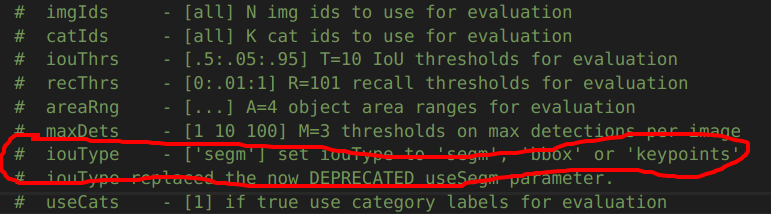
’segm‘表示分割,‘bbox’表示目标检测,‘keypoints’表示人体关键点检测
改进后的代码
from pycocotools.coco import COCO
from pycocotools.cocoeval import COCOeval
import numpy as np
import skimage.io as io
import pylab,json
import argparse

if __name__ == "__main__":
    parser = argparse.ArgumentParser()
    parser.add_argument("-g", "--gt", type=str, help="Assign the groud true path.", default=None)
    parser.add_argument("-d", "--dt", type=str, help="Assign the detection result path.", default=None)
    args = parser.parse_args()

    cocoGt = COCO(args.gt)
    cocoDt = cocoGt.loadRes(args.dt)
    cocoEval = COCOeval(cocoGt, cocoDt, "keypoints")
    cocoEval.evaluate()
    cocoEval.accumulate()
    cocoEval.summarize()
COCO Caption
coco
- ‘info’: {},
- ‘images’: [],
- ‘licenses’: [],
- ‘type’: ‘captions’,
- ‘annotations’:[]
images
- license
- url
- file_name
- height
- width
- data_captured
- id
annotations
- image_id
- id
- caption
Karpathy’s split
Image Caption COCO(Karpathy’s) 数据集格式:
首先是一个包含两个键值的字典:
- images: 字典, 包含数据集的各种内容
- dataset: 字符串, 数据集的名字
images字典包含如下字段:
- filepath: 字符串, 路径
- sentids: 列表, 句子 id
- filename: 字符串, 图片名称
- imgid: int, 图片id
- split: 字符串, 划分训练还是测试数据集
- sentences: 列表, 列表中有多个字段, 每个字典包含 tokens、raw、imgid、sentid等字段
- cocoid:int
sentences字典包含如下字段
- tokens: list, list 的元素是 str, tokenize之后的句子
- raw: str, 原句子
- imgid: int, 图像id
- sentid: int
Karpthy2coco
import json

with open("annotations\Karpthy_coco_test.json", "r", encoding='utf-8') as f:
    images = json.load(f)['images']

coco = {
    'info': {},
    'images': [],
    'licenses': [],
    'type': 'captions',
    'annotations':[]
}


for image in images:
    image_info = {}
    image_info['license'] = 0
    image_info['url'] = ''
    image_info['file_name'] = image['filename']
    image_info['height'] = 0
    image_info['width'] = 0
    image_info['data_captured'] = ''
    image_info['id'] = image['imgid']
    for sentence in image['sentences']:
        ann_info = {}
        ann_info['image_id'] = image['imgid']
        ann_info['id'] = sentence['sentid']
        ann_info['caption'] = sentence['raw']
        coco['annotations'].append(ann_info)

    coco['images'].append(image_info)


with open("test.json", "w", encoding="utf-8") as f:
    json.dump(coco, f, ensure_ascii=False)
Caption数量不为5的图片
filename: COCO_val2014_000000326781.jpg, num: 6
filename: COCO_val2014_000000291380.jpg, num: 6
filename: COCO_val2014_000000415746.jpg, num: 6
filename: COCO_val2014_000000096493.jpg, num: 6
filename: COCO_val2014_000000365289.jpg, num: 6
filename: COCO_val2014_000000145039.jpg, num: 6
filename: COCO_val2014_000000079047.jpg, num: 6
filename: COCO_val2014_000000156100.jpg, num: 6
filename: COCO_val2014_000000104320.jpg, num: 6
filename: COCO_val2014_000000232954.jpg, num: 6
filename: COCO_val2014_000000510643.jpg, num: 6
filename: COCO_val2014_000000206362.jpg, num: 6
filename: COCO_val2014_000000580117.jpg, num: 6
filename: COCO_val2014_000000279818.jpg, num: 6
filename: COCO_val2014_000000502141.jpg, num: 6
filename: COCO_val2014_000000056430.jpg, num: 6
filename: COCO_val2014_000000502982.jpg, num: 6
filename: COCO_val2014_000000328962.jpg, num: 6
filename: COCO_val2014_000000329307.jpg, num: 6
filename: COCO_val2014_000000227599.jpg, num: 6
filename: COCO_val2014_000000215259.jpg, num: 6
filename: COCO_val2014_000000163057.jpg, num: 6
filename: COCO_val2014_000000142742.jpg, num: 6
filename: COCO_val2014_000000212842.jpg, num: 6
filename: COCO_val2014_000000131557.jpg, num: 6
filename: COCO_val2014_000000289516.jpg, num: 6
filename: COCO_val2014_000000165257.jpg, num: 6
filename: COCO_val2014_000000114710.jpg, num: 6
filename: COCO_val2014_000000353977.jpg, num: 6
filename: COCO_val2014_000000461634.jpg, num: 6
filename: COCO_val2014_000000148034.jpg, num: 6
filename: COCO_val2014_000000557447.jpg, num: 6
filename: COCO_val2014_000000438258.jpg, num: 6
filename: COCO_val2014_000000406377.jpg, num: 6
filename: COCO_val2014_000000482605.jpg, num: 6
filename: COCO_val2014_000000092771.jpg, num: 6
filename: COCO_val2014_000000298656.jpg, num: 6
filename: COCO_val2014_000000086843.jpg, num: 6
filename: COCO_val2014_000000230432.jpg, num: 6
filename: COCO_val2014_000000475330.jpg, num: 6
filename: COCO_val2014_000000185721.jpg, num: 6
filename: COCO_val2014_000000431896.jpg, num: 7
filename: COCO_val2014_000000213586.jpg, num: 6
filename: COCO_val2014_000000208560.jpg, num: 6
filename: COCO_val2014_000000553482.jpg, num: 6
filename: COCO_val2014_000000523244.jpg, num: 6
filename: COCO_val2014_000000434459.jpg, num: 6
filename: COCO_val2014_000000190841.jpg, num: 6
filename: COCO_val2014_000000178835.jpg, num: 6
filename: COCO_val2014_000000328030.jpg, num: 6
filename: COCO_val2014_000000035525.jpg, num: 6
filename: COCO_val2014_000000079878.jpg, num: 6
filename: COCO_val2014_000000167270.jpg, num: 6
filename: COCO_val2014_000000509750.jpg, num: 6
filename: COCO_val2014_000000445048.jpg, num: 6
filename: COCO_val2014_000000104095.jpg, num: 6
filename: COCO_val2014_000000405444.jpg, num: 6
filename: COCO_val2014_000000209145.jpg, num: 6
filename: COCO_val2014_000000581245.jpg, num: 6
filename: COCO_val2014_000000121572.jpg, num: 6
filename: COCO_val2014_000000241758.jpg, num: 6
filename: COCO_val2014_000000353408.jpg, num: 6
filename: COCO_val2014_000000027609.jpg, num: 6
filename: COCO_val2014_000000488201.jpg, num: 6
filename: COCO_val2014_000000204311.jpg, num: 6
filename: COCO_val2014_000000359034.jpg, num: 6
filename: COCO_val2014_000000278172.jpg, num: 6
filename: COCO_val2014_000000124294.jpg, num: 6
filename: COCO_val2014_000000567315.jpg, num: 6
filename: COCO_val2014_000000449768.jpg, num: 6
filename: COCO_val2014_000000100008.jpg, num: 6
filename: COCO_val2014_000000017260.jpg, num: 6
filename: COCO_val2014_000000320428.jpg, num: 6
filename: COCO_val2014_000000325894.jpg, num: 6
filename: COCO_val2014_000000081103.jpg, num: 6
filename: COCO_val2014_000000084258.jpg, num: 6
filename: COCO_val2014_000000446459.jpg, num: 6
filename: COCO_val2014_000000186060.jpg, num: 6
filename: COCO_val2014_000000242095.jpg, num: 6
filename: COCO_val2014_000000336464.jpg, num: 7
filename: COCO_val2014_000000411564.jpg, num: 6
filename: COCO_val2014_000000577631.jpg, num: 6
filename: COCO_val2014_000000324322.jpg, num: 6
filename: COCO_val2014_000000318911.jpg, num: 6
filename: COCO_val2014_000000488004.jpg, num: 6
filename: COCO_val2014_000000485149.jpg, num: 6
filename: COCO_val2014_000000188346.jpg, num: 6
filename: COCO_val2014_000000222771.jpg, num: 6
filename: COCO_val2014_000000449312.jpg, num: 6
filename: COCO_val2014_000000002923.jpg, num: 6
filename: COCO_val2014_000000424633.jpg, num: 6
filename: COCO_val2014_000000179869.jpg, num: 6
filename: COCO_val2014_000000358884.jpg, num: 6
filename: COCO_val2014_000000561589.jpg, num: 6
filename: COCO_val2014_000000459032.jpg, num: 6
filename: COCO_val2014_000000162256.jpg, num: 6
filename: COCO_val2014_000000508977.jpg, num: 6
filename: COCO_val2014_000000334760.jpg, num: 6
filename: COCO_val2014_000000365194.jpg, num: 6
filename: COCO_val2014_000000362545.jpg, num: 6
filename: COCO_val2014_000000387482.jpg, num: 6
filename: COCO_val2014_000000399573.jpg, num: 6
filename: COCO_val2014_000000216369.jpg, num: 6
filename: COCO_val2014_000000563665.jpg, num: 6
filename: COCO_val2014_000000561729.jpg, num: 6
filename: COCO_val2014_000000442875.jpg, num: 6
filename: COCO_val2014_000000023247.jpg, num: 7
filename: COCO_val2014_000000253036.jpg, num: 6
filename: COCO_val2014_000000143236.jpg, num: 6
filename: COCO_val2014_000000103030.jpg, num: 6
filename: COCO_val2014_000000461248.jpg, num: 6
filename: COCO_val2014_000000027065.jpg, num: 6
filename: COCO_val2014_000000198271.jpg, num: 6
filename: COCO_val2014_000000561088.jpg, num: 6
filename: COCO_val2014_000000127279.jpg, num: 6
filename: COCO_val2014_000000075663.jpg, num: 6
filename: COCO_val2014_000000250440.jpg, num: 6
filename: COCO_val2014_000000539238.jpg, num: 6
filename: COCO_val2014_000000124327.jpg, num: 6
filename: COCO_val2014_000000507273.jpg, num: 6
filename: COCO_val2014_000000545958.jpg, num: 6
filename: COCO_val2014_000000026735.jpg, num: 6
filename: COCO_val2014_000000332461.jpg, num: 6
filename: COCO_val2014_000000038070.jpg, num: 6
filename: COCO_val2014_000000224610.jpg, num: 6
filename: COCO_val2014_000000248148.jpg, num: 6
filename: COCO_val2014_000000574411.jpg, num: 6
filename: COCO_val2014_000000575916.jpg, num: 6
filename: COCO_val2014_000000083768.jpg, num: 6
filename: COCO_val2014_000000157581.jpg, num: 6
filename: COCO_val2014_000000134574.jpg, num: 6
filename: COCO_train2014_000000218956.jpg, num: 6
filename: COCO_train2014_000000271875.jpg, num: 6
filename: COCO_train2014_000000304126.jpg, num: 6
filename: COCO_train2014_000000217327.jpg, num: 6
filename: COCO_train2014_000000428407.jpg, num: 6
filename: COCO_train2014_000000424539.jpg, num: 6
filename: COCO_train2014_000000149464.jpg, num: 6
filename: COCO_train2014_000000561789.jpg, num: 6
filename: COCO_train2014_000000438926.jpg, num: 6
filename: COCO_train2014_000000458592.jpg, num: 6
filename: COCO_train2014_000000431555.jpg, num: 6
filename: COCO_train2014_000000378149.jpg, num: 6
filename: COCO_train2014_000000082273.jpg, num: 6
filename: COCO_train2014_000000101882.jpg, num: 6
filename: COCO_train2014_000000059943.jpg, num: 6
filename: COCO_train2014_000000438701.jpg, num: 6
filename: COCO_train2014_000000418826.jpg, num: 6
filename: COCO_train2014_000000399213.jpg, num: 6
filename: COCO_train2014_000000258635.jpg, num: 6
filename: COCO_train2014_000000357435.jpg, num: 6
filename: COCO_train2014_000000147972.jpg, num: 6
filename: COCO_train2014_000000206042.jpg, num: 6
filename: COCO_train2014_000000412830.jpg, num: 6
filename: COCO_train2014_000000104006.jpg, num: 6
filename: COCO_train2014_000000200068.jpg, num: 6
filename: COCO_train2014_000000333863.jpg, num: 6
filename: COCO_train2014_000000284994.jpg, num: 6
filename: COCO_train2014_000000126246.jpg, num: 6
filename: COCO_train2014_000000182118.jpg, num: 6
filename: COCO_train2014_000000050031.jpg, num: 6
filename: COCO_train2014_000000036267.jpg, num: 6
filename: COCO_train2014_000000018748.jpg, num: 6
filename: COCO_train2014_000000088419.jpg, num: 6
filename: COCO_train2014_000000027190.jpg, num: 6
filename: COCO_train2014_000000112495.jpg, num: 6
filename: COCO_train2014_000000363273.jpg, num: 6
filename: COCO_train2014_000000082191.jpg, num: 6
filename: COCO_train2014_000000052109.jpg, num: 7
filename: COCO_train2014_000000506555.jpg, num: 6
filename: COCO_train2014_000000302071.jpg, num: 6
filename: COCO_train2014_000000172574.jpg, num: 6
filename: COCO_train2014_000000050601.jpg, num: 6
filename: COCO_train2014_000000105529.jpg, num: 6
filename: COCO_train2014_000000102288.jpg, num: 6
filename: COCO_train2014_000000354530.jpg, num: 6
filename: COCO_train2014_000000201425.jpg, num: 6
filename: COCO_train2014_000000052650.jpg, num: 6
filename: COCO_train2014_000000294309.jpg, num: 6
filename: COCO_train2014_000000033177.jpg, num: 6
filename: COCO_train2014_000000125394.jpg, num: 6
filename: COCO_train2014_000000401720.jpg, num: 6
filename: COCO_train2014_000000522338.jpg, num: 6
filename: COCO_train2014_000000249620.jpg, num: 6
filename: COCO_train2014_000000423881.jpg, num: 6
filename: COCO_train2014_000000205023.jpg, num: 6
filename: COCO_train2014_000000029799.jpg, num: 6
filename: COCO_train2014_000000038729.jpg, num: 6
filename: COCO_train2014_000000386864.jpg, num: 6
filename: COCO_train2014_000000348479.jpg, num: 6
filename: COCO_train2014_000000062943.jpg, num: 6
filename: COCO_train2014_000000047640.jpg, num: 6
filename: COCO_train2014_000000059934.jpg, num: 6
filename: COCO_train2014_000000309206.jpg, num: 6
filename: COCO_train2014_000000109095.jpg, num: 6
filename: COCO_train2014_000000413202.jpg, num: 6
filename: COCO_train2014_000000085777.jpg, num: 6
filename: COCO_train2014_000000302217.jpg, num: 6
filename: COCO_train2014_000000527509.jpg, num: 6
filename: COCO_train2014_000000541039.jpg, num: 6
filename: COCO_train2014_000000551023.jpg, num: 6
filename: COCO_train2014_000000519554.jpg, num: 6
filename: COCO_train2014_000000321338.jpg, num: 6
filename: COCO_train2014_000000255800.jpg, num: 6
filename: COCO_train2014_000000404148.jpg, num: 6
filename: COCO_train2014_000000360739.jpg, num: 6
filename: COCO_train2014_000000014203.jpg, num: 6
filename: COCO_train2014_000000515040.jpg, num: 6
filename: COCO_train2014_000000062397.jpg, num: 6
filename: COCO_train2014_000000183342.jpg, num: 6
filename: COCO_train2014_000000464498.jpg, num: 6
filename: COCO_train2014_000000300239.jpg, num: 6
filename: COCO_train2014_000000261670.jpg, num: 6
filename: COCO_train2014_000000400763.jpg, num: 6
filename: COCO_train2014_000000195998.jpg, num: 6
filename: COCO_train2014_000000543058.jpg, num: 6
filename: COCO_train2014_000000580579.jpg, num: 6
filename: COCO_train2014_000000348107.jpg, num: 6
filename: COCO_train2014_000000200133.jpg, num: 6
filename: COCO_train2014_000000244928.jpg, num: 6
filename: COCO_train2014_000000476074.jpg, num: 6
filename: COCO_train2014_000000286151.jpg, num: 6
filename: COCO_train2014_000000212197.jpg, num: 6
filename: COCO_train2014_000000067462.jpg, num: 6
filename: COCO_train2014_000000087726.jpg, num: 6
filename: COCO_train2014_000000465554.jpg, num: 6
filename: COCO_train2014_000000218606.jpg, num: 6
filename: COCO_train2014_000000216191.jpg, num: 6
filename: COCO_train2014_000000240967.jpg, num: 6
filename: COCO_train2014_000000253064.jpg, num: 6
filename: COCO_train2014_000000424607.jpg, num: 6
filename: COCO_train2014_000000227337.jpg, num: 6
filename: COCO_train2014_000000496613.jpg, num: 6
filename: COCO_train2014_000000565110.jpg, num: 6
filename: COCO_train2014_000000305940.jpg, num: 6
filename: COCO_train2014_000000484277.jpg, num: 6
filename: COCO_train2014_000000250802.jpg, num: 6
filename: COCO_train2014_000000184868.jpg, num: 6
filename: COCO_train2014_000000373905.jpg, num: 6
filename: COCO_train2014_000000311066.jpg, num: 6
filename: COCO_train2014_000000561594.jpg, num: 6
filename: COCO_train2014_000000229401.jpg, num: 6
filename: COCO_train2014_000000156328.jpg, num: 6
filename: COCO_train2014_000000227918.jpg, num: 6
filename: COCO_train2014_000000475796.jpg, num: 6
filename: COCO_train2014_000000522013.jpg, num: 6
filename: COCO_train2014_000000371260.jpg, num: 6
filename: COCO_train2014_000000341894.jpg, num: 6
filename: COCO_train2014_000000250809.jpg, num: 6
filename: COCO_train2014_000000196283.jpg, num: 6
filename: COCO_train2014_000000283604.jpg, num: 6
filename: COCO_train2014_000000392152.jpg, num: 6
filename: COCO_train2014_000000013714.jpg, num: 6
filename: COCO_train2014_000000364374.jpg, num: 6
filename: COCO_train2014_000000359481.jpg, num: 6
filename: COCO_train2014_000000102076.jpg, num: 6
filename: COCO_train2014_000000234396.jpg, num: 6
filename: COCO_train2014_000000033840.jpg, num: 6
filename: COCO_train2014_000000542307.jpg, num: 6
filename: COCO_train2014_000000533228.jpg, num: 6
filename: COCO_train2014_000000378522.jpg, num: 6
filename: COCO_train2014_000000161958.jpg, num: 6
filename: COCO_train2014_000000572061.jpg, num: 6
filename: COCO_train2014_000000022582.jpg, num: 6
filename: COCO_train2014_000000397461.jpg, num: 6
filename: COCO_train2014_000000469260.jpg, num: 6
filename: COCO_train2014_000000372510.jpg, num: 6
filename: COCO_train2014_000000235168.jpg, num: 6
filename: COCO_train2014_000000254362.jpg, num: 6
filename: COCO_train2014_000000015963.jpg, num: 6
filename: COCO_train2014_000000516620.jpg, num: 6
filename: COCO_train2014_000000280879.jpg, num: 6
filename: COCO_train2014_000000026764.jpg, num: 6
filename: COCO_train2014_000000268403.jpg, num: 6
filename: COCO_train2014_000000478823.jpg, num: 6
filename: COCO_train2014_000000174504.jpg, num: 6
filename: COCO_train2014_000000528840.jpg, num: 6
filename: COCO_train2014_000000421380.jpg, num: 6
filename: COCO_train2014_000000280508.jpg, num: 6
filename: COCO_train2014_000000477420.jpg, num: 6
filename: COCO_train2014_000000387901.jpg, num: 6
filename: COCO_train2014_000000479332.jpg, num: 6
filename: COCO_train2014_000000141510.jpg, num: 6
filename: COCO_train2014_000000183646.jpg, num: 6
filename: COCO_train2014_000000259658.jpg, num: 6
filename: COCO_train2014_000000081967.jpg, num: 6
filename: COCO_train2014_000000355657.jpg, num: 6
filename: COCO_train2014_000000391065.jpg, num: 6
filename: COCO_train2014_000000225667.jpg, num: 6
filename: COCO_train2014_000000501177.jpg, num: 6
filename: COCO_train2014_000000090718.jpg, num: 6
filename: COCO_train2014_000000245243.jpg, num: 6
filename: COCO_train2014_000000449896.jpg, num: 6
filename: COCO_train2014_000000018464.jpg, num: 6
filename: COCO_train2014_000000197827.jpg, num: 6
filename: COCO_train2014_000000487036.jpg, num: 6
filename: COCO_train2014_000000123147.jpg, num: 6
filename: COCO_train2014_000000049283.jpg, num: 6
filename: COCO_train2014_000000321262.jpg, num: 6
filename: COCO_train2014_000000232490.jpg, num: 6
filename: COCO_train2014_000000080739.jpg, num: 6
filename: COCO_train2014_000000079701.jpg, num: 6
filename: COCO_train2014_000000483889.jpg, num: 6
filename: COCO_train2014_000000136015.jpg, num: 6
filename: COCO_train2014_000000166508.jpg, num: 6
filename: COCO_train2014_000000017065.jpg, num: 6
filename: COCO_train2014_000000580822.jpg, num: 6
filename: COCO_train2014_000000149295.jpg, num: 6
filename: COCO_train2014_000000415943.jpg, num: 6
filename: COCO_train2014_000000252894.jpg, num: 6
filename: COCO_train2014_000000002193.jpg, num: 6
filename: COCO_train2014_000000044780.jpg, num: 6
filename: COCO_train2014_000000088005.jpg, num: 6
filename: COCO_train2014_000000462899.jpg, num: 6
filename: COCO_train2014_000000525318.jpg, num: 6
filename: COCO_train2014_000000492215.jpg, num: 6
filename: COCO_train2014_000000527139.jpg, num: 6
filename: COCO_train2014_000000267152.jpg, num: 6
filename: COCO_train2014_000000544085.jpg, num: 6
filename: COCO_train2014_000000182933.jpg, num: 6
filename: COCO_train2014_000000473462.jpg, num: 6
filename: COCO_train2014_000000397832.jpg, num: 6
filename: COCO_train2014_000000034938.jpg, num: 6
filename: COCO_train2014_000000189831.jpg, num: 6
filename: COCO_train2014_000000480712.jpg, num: 6
filename: COCO_train2014_000000443393.jpg, num: 6
filename: COCO_train2014_000000014864.jpg, num: 6
filename: COCO_train2014_000000353400.jpg, num: 6
Flickr30k(Karpathy’s) 数据集格式
首先是一个包含两个键值的字典:
- images: 是一个列表, 列表中的内容是字典, 包含数据集的各种内容
- dataset: 字符串, 数据集的名字
images列表, 列表中包含多个字典, 每个字典包含如下字段:
-
sentids: 列表, 句子 id
-
imgid:int, 图片id
-
sentences: 列表, 列表中有多个字典, 每个字典包含 tokens、raw、imgid、sentid等字段
-
- tokens:是一个列表, 列表中是多个字符串, 字符串是分词后的每个单词
- raw: 是一个字符串, 原始的字符串
- imgid: int, 表示图像id
- sentid: int 表示句子id
-
split: 字符串, 划分训练还是测试数据集
- filename: 字符串, 图片名称
COCO_Detection (Bottom-up Features)
HDF5 格式
group 由 image_id + boxes、 cls_prob 和 features 组成。
boxes: (N, 4), N为目标检测的结果数量, 4为bounding boxcls_prob: (N, 1601), N为目标检测的结果数量, 1601为每个类别的概率features: (N, 2048),N为目标检测的结果数量, 2048为每个特征的维数
中文 Flickr 8K
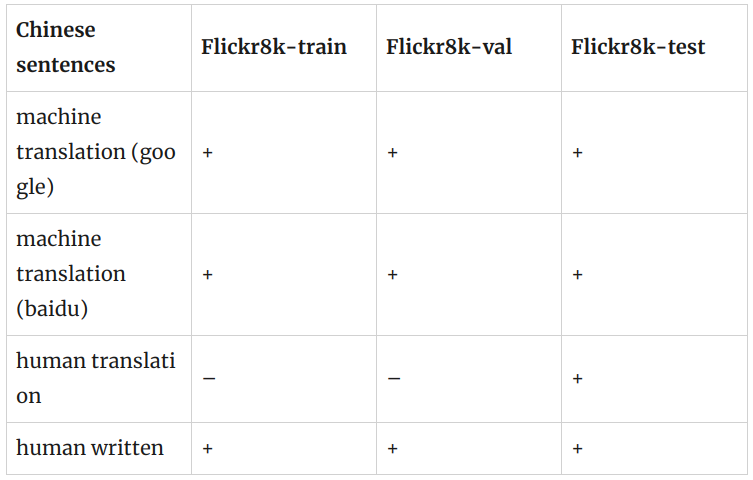
Chinese sentences written by native Chinese speakers: flickr8kzhb.caption
Chinese sentences generated by Baidu translation
- icmr2016 version: flickr8kzhc.caption
- version 20160815: flickr8kzhb.caption.txt.v20160815
Chinese sentences generated by Google translation
- icmr2016 version: flickr8kzhg.caption
- version 20160816: flickr8kzhg.caption.txt.v20160816
Chinese sentences generated by human translation: flickr8kzhmtest.captions
Original English sentences: flickr8kenc.caption
2017 AI Challenge
https://pan.baidu.com/s/1JBrwhCyZT-V3mxnXZbyEag
密码: o8c0
train
lsit, list 元素是 dict
- url
- image_id: str,文件名,有jpg后缀
- caption: list, list 的元素是 str, 是描述
val
list, list 的元素是 dict
- url
- image_id: str, 文件名
- caption: list, list 的元素是 str, 是描述
test_a
dict
- ‘annotations’,
- ‘images’: list, list 的元素是 dict
- ‘info’,
- ‘licenses’,
- ‘type’
annotations
list, list 的元素是 dict
- caption: str, tokenize之后的caption
- id: int
- image_id: int, image 的 id
images
list, list 的元素是 dcit
- file_name: str, 无.jpg后缀
- id: int
test_a2COCO
import json

test_a_path = "./test_a/caption_test_a_annotations_20180103.json"
with open(path, "r", encoding='utf-8') as f:
    data = json.load(f)

# test_a
print(len(data['annotations'][0]['caption']))
print(len(data['images']))
print(data['images'][:5])

aic_coco_test_a = {
    'info': {},
    'images': [],
    'licenses': [],
    'type': 'captions',
    'annotations':[]
}

for image in data['images'][::5]:
    image_info = {}
    image_info['license'] = 0
    image_info['url'] = ''
    image_info['file_name'] = image['file_name']
    image_info['height'] = 0
    image_info['width'] = 0
    image_info['data_captured'] = ''
    image_info['id'] = image['id']
    aic_coco_test_a['images'].append(image_info)

aic_coco_test_a['annotations'] = data['annotations']

print(len(aic_coco_test_a['images']))
print(len(aic_coco_test_a['annotations']))

with open("./test_a/aic_coco_test_a.json", "w", encoding='utf-8') as f:
    json.dump(aic_coco_test_a, f, ensure_ascii=False)
test_b
dict
- ‘annotations’,
- ‘images’: list, list 的元素是 dict
- ‘info’,
- ‘licenses’,
- ‘type’
annotations
list, list 的元素是 dict
- caption: str, tokenize之后的caption
- id: int
- image_id: int, image 的 id
images
list, list 的元素是 dcit
- file_name: str, 文件名, 无jpg后缀
- id: int
test_b2COCO
import json

test_b_path = "./test_b/caption_test_b_annotations_20180103.json"
with open(path, "r", encoding='utf-8') as f:
    data = json.load(f)

# test_b
print(len(data['annotations'][0]['caption']))
print(len(data['images']))
print(data['images'][:5])

aic_coco_test_b = {
    'info': {},
    'images': [],
    'licenses': [],
    'type': 'captions',
    'annotations':[]
}

for image in data['images'][::5]:
    image_info = {}
    image_info['license'] = 0
    image_info['url'] = ''
    image_info['file_name'] = image['file_name']
    image_info['height'] = 0
    image_info['width'] = 0
    image_info['data_captured'] = ''
    image_info['id'] = image['id']
    aic_coco_test_b['images'].append(image_info)

aic_coco_test_b['annotations'] = data['annotations']

print(len(aic_coco_test_b['images']))
print(len(aic_coco_test_b['annotations']))

with open("./test_b/aic_coco_test_b.json", "w", encoding='utf-8') as f:
    json.dump(aic_coco_test_b, f, ensure_ascii=False)
HLB
HLB2COCO
import json
import pandas as pd

# with open("../dataset/train/train_labels.csv", "r", encoding='utf-8') as f:
#     reader = csv.reader(f)
#     for row in reader:
#         print(row)
#         print(type(row))
#         break

data = pd.read_csv("../dataset/train/train_labels.csv")
image_names = data['image_name']
comment = data['comment']
print(len(image_names))
print(len(comment))

hlb_coco = {
    'info': {},
    'images': [],
    'licenses': [],
    'type': 'captions',
    'annotations':[]
}


image_id = 0
for image in image_names[::5]:
    image_info = {}
    image_info['license'] = 0
    image_info['url'] = ''
    image_info['file_name'] = image
    image_info['height'] = 0
    image_info['width'] = 0
    image_info['data_captured'] = ''
    image_info['id'] = image_id

    for i in range(5):
        ann_info = {}
        ann_info['image_id'] = image_id
        ann_info['id'] = 5 * image_id + i
        ann_info['caption'] = comment[5 * image_id + i]
        hlb_coco['annotations'].append(ann_info)
    image_id += 1
    hlb_coco['images'].append(image_info)

with open("test.json", "w", encoding="utf-8") as f:
    json.dump(hlb_coco, f, ensure_ascii=False)
FFHQ
LSUN
10 million labeled images in 10 scene categories and 59 million labeled images in 20 object categories.
Cityscapes
这个大规模数据集包含了从50个不同城市的街道场景中记录的一组不同的立体视频序列,除了一组更大的20000弱注释帧之外,还有5000帧的高质量像素级注释。
Dataset Structure
Cityscapes数据集的文件夹结构如下
{root}/{type}{video}/{split}/{city}/{city}_{seq:0>6}_{frame:0>6}_{type}{ext}
每个元素的意思是:
- root: Cityscapes数据集的根文件夹。我们的许多脚本会检查指向该文件夹的环境变量 CITYSCAPES_DATASET 是否存在,并将其作为默认选择。
- type: 数据的类型或形态, 比如 gtFine 表示 ground truth, 或者 leftImg8bit 表示 左 8-bit 图像。
- split: 分隔, 比如 train/val/test/train_extra/demoVideo。 注意,并不是所有类型的数据都存在于所有的分割中。因此,偶尔会发现空文件夹,不要感到惊讶。
- city: 记录这部分数据集的城市。
- seq: 6位数字的序列号。
- frame:帧号为6位。需要注意的是,在一些城市,虽然记录了很长的序列,但是很少,而在一些城市,记录了很多短序列,其中只有第19帧被注释。
- ext: 文件的扩展名和后缀(可选), 比如 _polygons.json 对于 ground truth 文件。
type 的可能值:
- gtFine: 精细标注、2975训练、500验证和1525测试。这种类型的注释用于验证、测试,也可以用于训练。注释使用包含individual polygons 的 json文件进行编码。此外, 我们提供 png 图像, 它的像素值被编码为标签。 查看 helpers/labels,py 和 preparation 中的脚本查看更多细节。
- gtCoarse: 粗标注,另一组19998张训练图像可用于所有训练和验证(train_extra)。 这些标注可以用于训练,可以与gtFine一起使用,也可以单独用于监督较弱的设置中。
- gtBbox3d: 车辆的3D边框标注。详情请参考 Cityscapes 3D (Gählert et al., CVPRW ‘20)。
- gtBboxCityPersons : 行人边界框标注,适用于所有训练和验证图像。详情请查看 helpers/labels_cityPersons.py 以及 CityPersons (Zhang et al., CVPR ‘17)。边框的四个值是(x, y, w, h),其中(x, y)是它的左上角,(w, h)是它的宽度和高度。
- leftImg8bit: 左图为8位LDR格式。这些是标准的带标注的图像。
- leftImg8bit_blurred: 左侧图像为8位LDR格式,模糊的人脸和车牌。请在原始图像上计算结果,但使用模糊的图像进行可视化。我们感谢 Mapillary模糊图像。
- leftImg16bit: 左图为16位HDR格式。这些图像每像素提供16位色深,包含更多信息,特别是在场景中非常暗或明亮的部分。警告:图像存储为16位png,这是非标准的,并不是所有库都支持。
- rightImg8bit: 右侧立体视图为8位LDR格式。
- rightImg16bit: 右侧立体视图为16位HDR格式。
- timestamp: 以ns表示的记录时间。每个序列的第一帧总是有一个0的时间戳。
- disparity: 预先计算的视差深度图。警告:图像存储为16位png,这是非标准的,并不是所有库都支持。
- camera: 内外相机校准。详情见 csCalibration.pdf.
- vehicle: 车辆里程表,GPS坐标和室外温度。详情见: csCalibration.pdf.
随着时间的推移,可能会添加更多的类型,而且不是所有类型最初都是可用的。如果您需要其他元数据来运行您的方法,请告诉我们。
split的可能值为:
- train: 通常用于训练,包含精粗标注2975幅图像
- val: 应该用于超参数验证,包含500张带有精细和粗糙注释的图像。也可用于训练。
- test: 用于在我们的评估服务器上测试。标注不是公开的,但为了方便,我们包含了ego-vehicle 标注和 rectification border 标注。
- train_extra:可以选择性地用于训练,包含19998张带有粗糙注释的图像
- demoVideo: 视频序列可以用于定性评价,这些视频没有标注
Usage
该安装脚本 将 安装为一个名为cityscapessscripts的python模块,并公开以下工具
- csDownload: 通过命令行下载城市景观包。
- csViewer: 查看图像并覆盖注释。
- csLabelTool: Tool that we used for labeling.
- csEvalPixelLevelSemanticLabeling:评估验证集上的像素级语义标记结果。该工具也用于评估测试集上的结果。
- csEvalPanopticSemanticLabeling: 在验证集上评估全景分割结果。该工具也用于评估测试集上的结果。
- csEvalObjectDetection3d: 在验证集上评估3D对象检测。该工具也用于评估测试集上的结果。
- csCreateTrainIdLabelImgs: 将 polygonal 格式的标注转换为带有标签id的png图像,其中像素编码为“train IDs”,您可以在labels.py 中定义
- csCreateTrainIdInstanceImgs: 将 polygonal 格式的注释转换为带有实例 id 的png图像,其中像素编码由“train IDs”组成的实例id。
- csCreatePanopticImgs: 转换标注在标准png格式到 COCO panoptic segmentation format。
- csPlot3dDetectionResults: 可视化三维物体检测评估结果存储在 .json 格式。
Package Content
该包的结构如下:
- helpers: helpers文件, 它由其他脚本include
- viewer: 查看图片和标注
- preparation: 将ground truth标注转换为适合您的方法的格式
- evaluation: 验证你的方法
- annotation: 用于标记数据集的标注工具
- download: 对于城市景观的包下载
注意,所有文件的顶部都有一个小文档。最重要的文件
- helpers/labels.py: 定义所有语义类的id并提供各种类属性之间的映射的中心文件。
- helpers/labels_cityPersons.py: 定义所有CityPersons行人类的id并提供各种类属性之间的映射的文件。
- setup.py: 运行 CYTHONIZE_EVAL= python setup.py build_ext –inplace 激活 cpython 插件 获取更快的 evaluation。 仅在ubuntu下测试。
Evaluation
如果您想在测试集中测试您的方法,请在提供的测试图像上运行您的方法,并提交结果:Submission Page
结果格式在我们的评估脚本的顶部进行了描述:
- Pixel Level Semantic Labeling
- Instance Level Semantic Labeling
- Panoptic Semantic Labeling
- 3D Object Detection
注意,我们的评估脚本包含在scripts文件夹中,可以用于测试验证集上的方法。关于提交过程的更多细节,请咨询我们的网站。
Musk(Version2)
Data Set Information:
这个数据集描述了一组102个 molecules ,其中39个被人类专家判定为 musks ,其余63个被判定为 non-musks。 我们的目标是预测新 molecules 是 mask 还是 non-mask。然而,描述这些 molecules 的166个特征取决于 molecules 的确切形状或 conformation。 因为 bonds 可以旋转,所以一个 molecule 可以有很多不同的形状。为了生成这个数据集,分子的所有 low-energy conformations 都被生成了6598个 conformations。
这种特征向量和 molecules 之间的多对一关系叫做 “multiple instance problem”。 当为这个这个数据学习一个分类器时,如果它的任何 conformations 被分类为 “musk”, 分类器应该将一个 molecule 分类为 “musk”。如果一个 molecule 没有一种 conformations 被归类为 “musk”,那么它就应该被归类为 “non-musk”。
Attribute Information:
molecule_name: 每个 molecule 的符号名称。Musks 的名字诸如 MUSK-188。 Non-musks 的名字为 NON-MUSK-jp13。
conformation_name: 每个 conformation 的符号名称。它们的格式为 MOL ISO+CONF,其中 MOL 是 molecule 数,ISO是立体异构体数(通常为1),CONF是 conformation 数。
f1 through f162: 这些是沿着 rays 的“距离特征”(见上文引用的论文)。这些距离是以 hundredths of Angstroms 测量的。距离可以是负的,也可以是正的,因为它们实际上是相对于沿每条 ray 放置的原点测量的。原始的由 “consensus musk” 定义的表面不再使用。因此,任何使用这些数据的实验都应该将这些特征值视为任意连续的尺度。特别地,算法不应该利用每个特征值的零点或符号。
f163: 这是 molecule 中氧原子到三维空间中指定点的距离。
f164:OXY-X: 从指定点的X位移
f165:OXY-Y: 从指定点的Y位移
f166:OXY-Z: 从指定点的Z位移
class: 0 => non-musk, 1 => musk
请注意, molecule_name 和 conformation_name 属性不能用来预测 class。
KITTI
kitti_infos_train.pkl
- image
-
- image_idx
-
- image_path
-
- image_shape
- point_cloud
-
- num_features
-
- velodyne_path
- calib
-
- P0
-
- P1
-
- P2
-
- P3
-
- R0_rect
-
- Tr_velo_to_cam
-
- Tr_imu_to_velo
- annos
-
- name
-
- truncated
-
- occluded
-
- alpha
-
- bbox
-
- dimensions
-
- location
-
- rotation_y
-
- score
-
- index
-
- group_ids
-
- difficulty
-
- num_points_in_gt
评价指标
precision,recall,AP,mAP
AP 如何计算的?
True positives : 飞机的图片被正确的识别成了飞机。
True negatives: 大雁的图片没有被识别出来,系统正确地认为它们是大雁。
False positives: 大雁的图片被错误地识别成了飞机。
False negatives: 飞机的图片没有被识别出来,系统错误地认为它们是大雁。
Precision 与 Recall
Precision其实就是在识别出来的图片中,True positives所占的比率:
\[\text{precision} = \frac{tp}{tp + fp} = \frac{tp}{n}\]其中的n代表的是(True positives + False positives),也就是系统一共识别出来多少照片 。
Recall 是被正确识别出来的个数与测试集中所有个数的比值:
\[\text{recall} = \frac{tp}{tp + fn}\]通常 $tp + fn$ 在目标检测中指groundTruth中该类真实目标数量, 可以理解为一共有多少张此类的照片。
AP(Average Precision)
AP是Precision-Recall曲线所围成的面积。具体计算可如下图所见:
这是预测结果框(红色)和GroundTruth(绿色)的对比。
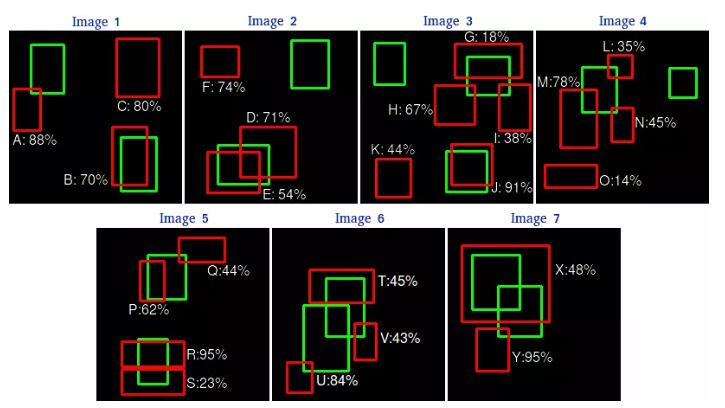
通过这张图,我们可以将每个候选框的预测信息标记出来。这里设定IOU>0.5为TP,否则为FP。
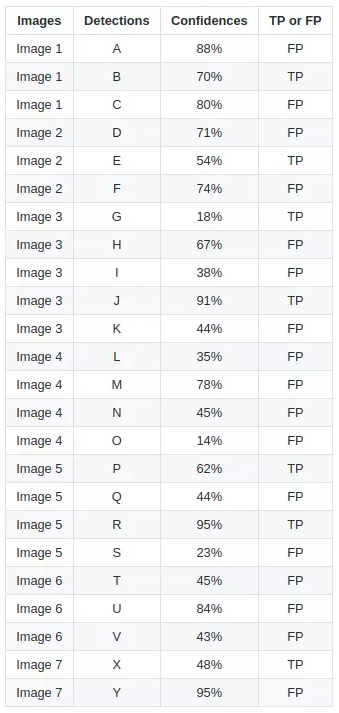
根据这张图可以画出PR曲线,按照置信度进行一次新的排序,就更加清晰明了。
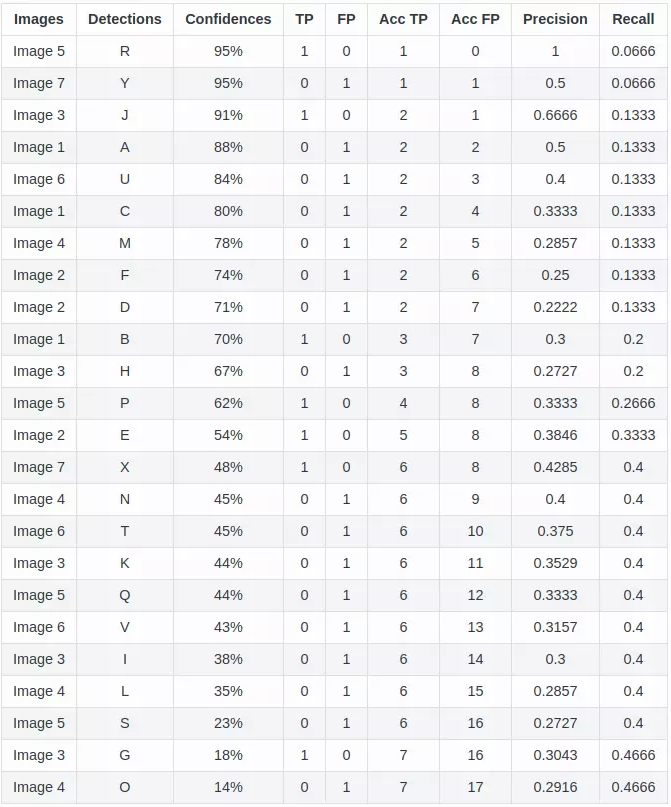
由上表,将这些(recall,precision)点标记在坐标轴中:
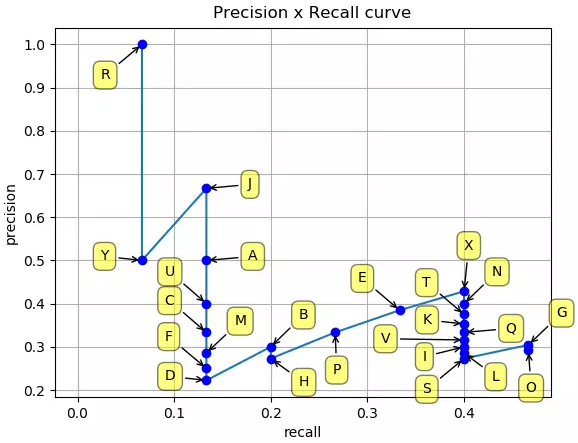
目标检测中的mAP(mean Average Precision)
Precision & recall
IoU (Intersection over union)
AP(Average Precision)
让我们用一个简单的例子来展示AP的计算。 在这个例子中,整个数据集只包含5个苹果。我们收集了所有图像中对苹果的预测,并根据预测的置信水平将其按降序排列。第二列表示预测是否正确。在本例中,如果 $IoU \geq 0.5$,则认为预测是正确的。
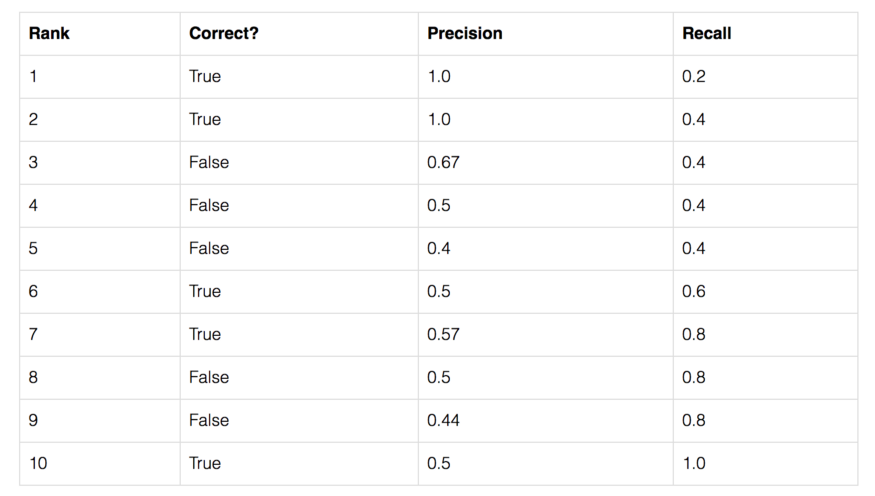
让我们以排名第3的那一行为例,演示如何首先计算 precision 和 recall。
Precision 是 TP 的比例 = $2/3$ = 0.67。
Recall 是 TP 占 可能存在的正样本 的比例 = $2/5$ = 0.4。
随着 rank 往下走, Recall 值增加。然而 precision 有一个 锯齿形 的模式 —— 当 rank 逐渐往下走时, 遇到 FP 的时候, precision下降, 遇到 TP 的时候, precision 上升。
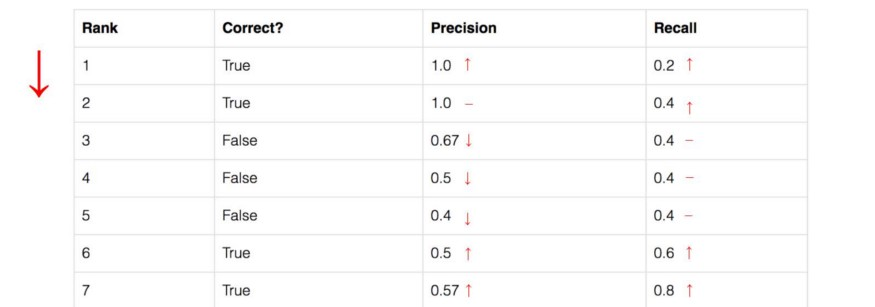
让我们把 precision 和 recall 值画出来,看看这个锯齿形的模式。
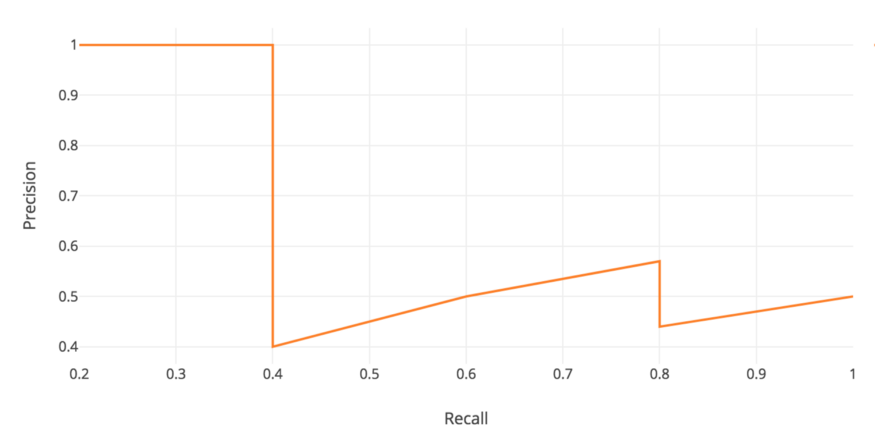
Average Precision(AP)的一般定义是找到上面的 precision-recall 曲线下的面积。
\[AP = \int_{0}^{1} p(r) dr\]Precision 和 recall 总是在0 到 1之间。 因此,AP也在0和1之间。在计算物体检测AP之前,我们通常会先平滑锯齿形图案。
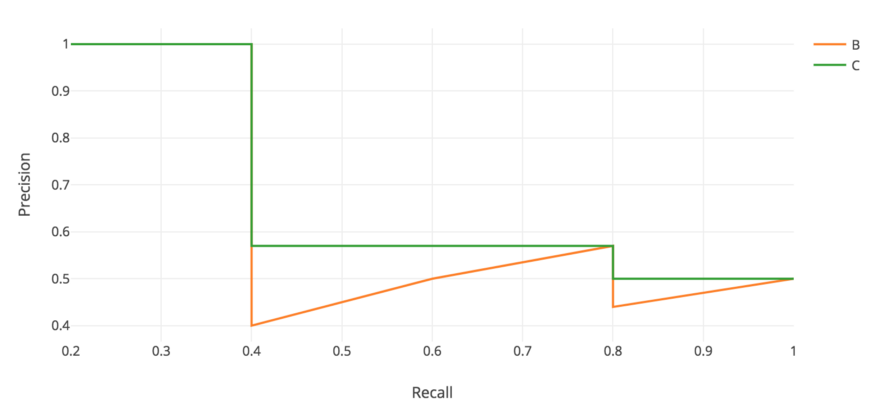
在每个 recall level 上,我们用该 recall level 右侧的最大 precision 值来替换每个 precision 值。
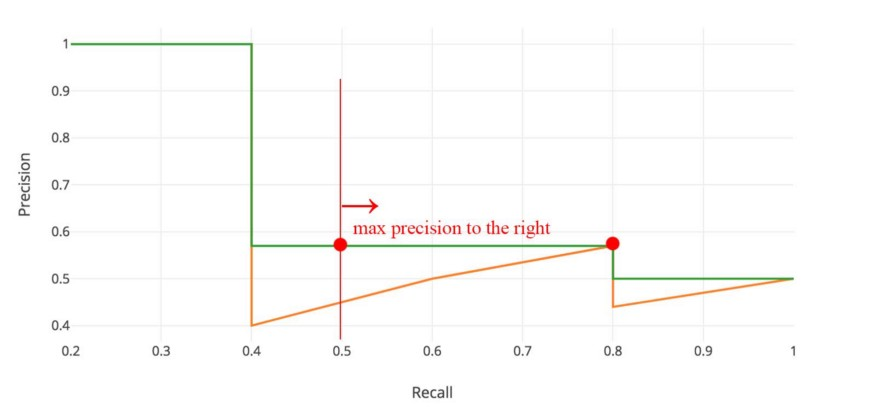
所以橙色的线被转换成绿色的线,曲线将单调递减,而不是锯齿形。计算出的AP值不太可能受到 rank 中微小变化的影响。在数学上,我们将召回 $\hat r$ 的 precision 值替换为对于任意 $recall \geq \hat r$ 的最大 precision。
\[P_{interp}(r) = \max_{\hat r \geq r} p(\tilde r)\]Interpolated AP
PASCAL VOC 是用于目标检测的流行数据集。对于 ASCAL VOC 挑战, 如果 $IoU \geq 0.5$ 则预测为正样本。 此外,如果检测到同一目标的多次检测,它将第一次计数为正值,而其余为负值。
在 Pascal VOC2008 中, 计算11点插值AP的平均值。
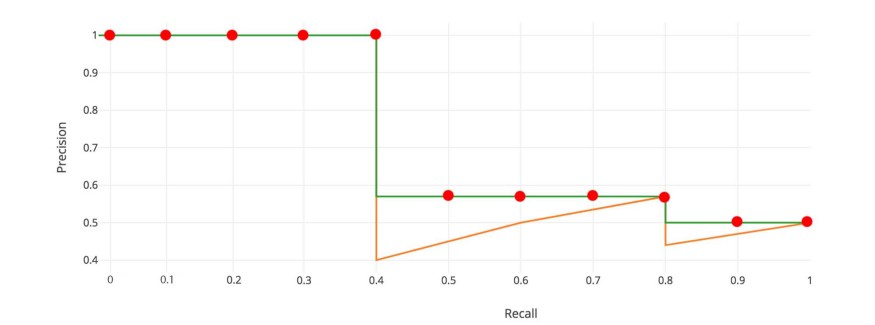
首先, 我们将 recall 值从 0 到 1.0 划分为 11 个点 —— 0, 0.1, 0.2, …, 0.9 和 1.0。接下来,我们计算这11个 recall 值 的 precision 的最大值 的平均值。
\[AP = \frac{1}{11} \times (AP_r(0) + AP_r(0.1), + ... + AP_r(1.0))\]在我们的例子中, $AP = (5 \times 1.0 + 4 \times 0.57 + 2 \times 0.5) / 11$。
下面是更准确的数学定义:
\[\begin{aligned} AP &= \frac{1}{11} \sum_{r \in \{0, ..., 1.0\}} AP_r \\ &= \frac{1}{11} \sum_{r \in \{0, ..., 1.0\}} P_{interp} (r) \end{aligned}\]其中
\[P_{interp}(r) = \max_{\tilde{r} \geq r} p(\tilde{r})\]当 $AP_r$ 变得非常小时, 我们可以假设 剩下的项 全都是0, 例如, 我们不必直到 recall 达到 100% 才做出预测。 如果可能的最大的precision level 跌到一个可忽略的级别, 我们可以停止。 对于PASCAL VOC中的20个不同的类,我们为每个类计算一个AP,并提供这20个AP结果的平均值。
根据原研究者的说法,使用11个插值点计算AP的意图是
以这种方式插值 precision/recall 曲线的目的是减少在 precision/recall 曲线中 “wiggles” 的影响, 该影响由于样本的ranking中的小变化导致。
然而,这种插值方法是一种近似方法,存在两个问题。它不够精确。第二,它失去了测量低AP方法差异的能力。因此,2008年以后PASCAL VOC采用了不同的AP计算。
AP (Area under curve AUC)
对于后来的Pascal VOC比赛,当最大 precision 值为下降沿时, VOC2010-2012在所有唯一的 recall 值 $(r_1, r_2,…)$ 上采样曲线。 通过这种改变,我们可以在去掉锯齿后测量 precision-recall 下的精确面积。
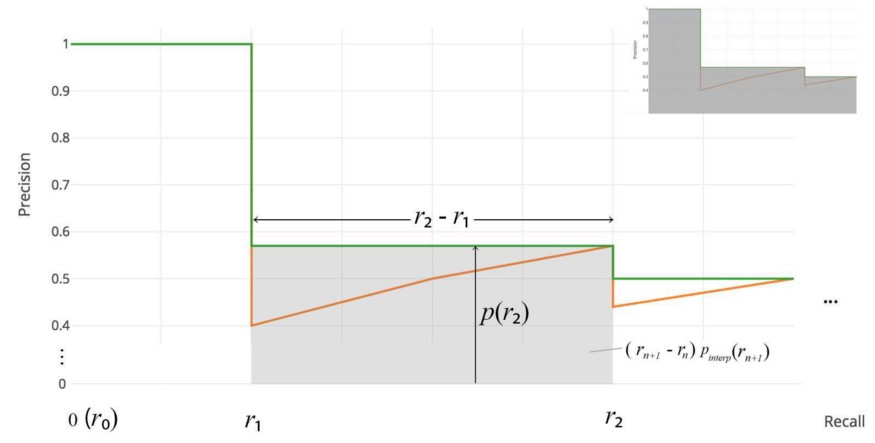
不需要近似或插值。我们不采样11个点,而是在 $p(r_i)$ 下降沿时采样,并将AP计算为矩形块的和。
\[AP = \sum(r_{n+1} - r_n) p_{interp}(r_{n+1}) \\ P_{interp}(r_{n+1}) = \max_{\tilde{r} \geq r_{n+1}} p(\tilde{r})\]这个定义叫做 Area Under Curve (AUC)。
COCO mAP
最新的研究论文往往只给出COCO数据集的结果。在COCO mAP中,计算中使用了一个101点的插值AP定义。对于COCO, AP是多个 IoU 的平均值(正确的匹配为最小IoU)。AP@[.5:.95]对应于 IoU 为 $0.5 \thicksim 0.95$ 的平均AP,步长为0.05。对于COCO比赛,AP是80个类别在10个IoU level的平均(AP@[.50:.05:.95]: 从 0.5 到 0.95, 步长为 0.05)。 下面是为COCO数据集收集的一些其他指标。
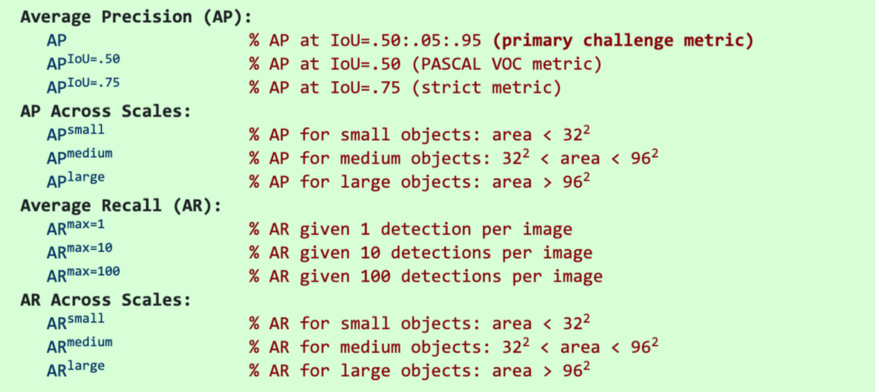
- 除非特别指出, AP和AR在多个交并比(IoU)值上取平均值。具体地说,我们使用了10个IoU的阈值:0.50:0.05:0.95。这有异于传统,传统的AP计算在单一 0.5 IoU 下计算 (与我们的指标 $AP^{IoU=.50}$相同)。 在不同IoU上平均鼓励检测器更好地定位。
- AP是所有类别的平均值。传统上, 这被叫做 “mean average precision” (mAP)。 我们没有区分AP和mAP (AR和mAR也一样),并假设从上下文来看, 它们的差异很明显。
- AP(所有10个IoU和所有80个类别的平均值)将决定挑战的获胜者。在考虑COCO的性能时,这应该被认为是最重要的指标。
- 在COCO中,小物体比大物体多。具体来说:大约41%的物体是小的( $area< 32^2$),34%是中等的($32^2 < area < 96^2$),24%是大的($area> 96^2$)。面积是用分割掩模中的像素数来度量的。
- AR是给定每幅图像固定检测数量的最大 recall,在类别和IoU上平均。AR与 proposal evaluation 中的相同名字的指标相关, 但是是在每一个类别上计算的。
- 所有指标允许在 每张图像(所有类别)最多100个最高得分的检测结果 上计算。
- 除了IoU的计算, bounding boxes 和 segmentation masks 检测的评估指标是相同的(分别对bbox和masks计算)。
这是YOLOv3 检测器的AP结果。
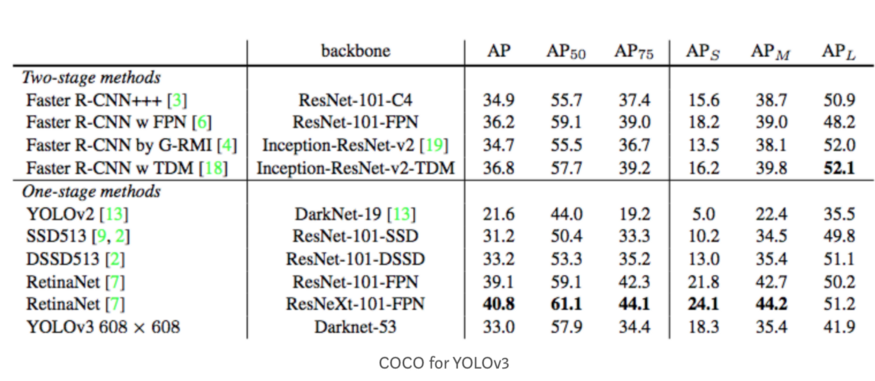
在上图中,AP@.75表示 IoU=0.75 的 AP。mAP (mean average precision)是AP的平均值。在某些情况下,我们计算每个类别的AP并将其平均。但在某些情况下,AP 和 mAP意思是相同的。例如,在COCO情况下,AP和mAP之间没有区别。这是COCO的直接引用:
AP是所有类别的平均值。传统上,这被称为 mean average precision(mAP)。我们没有区分AP和mAP (AR和mAR也一样),并假设从上下文来区分它们差异也很清楚。
在ImageNet中,使用了AUC方法。因此,即使所有的测量AP都遵循相同的原理,准确的计算可能会根据数据集的不同而有所不同。幸运的是,可以使用开发工具包来计算这个指标。
F1-Score
F1分数(F1-score)是分类问题的一个衡量指标。一些多分类问题的机器学习竞赛,常常将F1-score作为最终测评的方法。它是精确率和召回率的调和平均数,最大为1,最小为0。
\[F_1 = 2 · \frac{precision · recall}{precision + recall}\]此外还有F2分数和F0.5分数。F1分数认为召回率和精确率同等重要,F2分数认为召回率的重要程度是精确率的2倍,而F0.5分数认为召回率的重要程度是精确率的一半。计算公式为:
\[F_\beta = (1 + \beta^2) \frac{precision · recall}{(\beta^2 · precision) + reacall}\]G分数是另一种统一精确率和的召回率系统性能评估标准,G分数被定义为召回率和精确率的几何平均数。
计算过程
1)首先定义以下几个概念
TP(True Positive):预测答案正确FP(False Positive):错将其他类预测为本类FN(False Negative):本类标签预测为其他类标
2)通过第一步的统计值计算每个类别下的 precision 和 recall
精准度 / 查准率(precision):指被分类器判定正例中的正样本的比重
\[precision_k = \frac{TP}{TP + FP}\]召回率 / 查全率 (recall):指的是被预测为正例的占总的正例的比重
\[recall_k = \frac{TP}{TP + FN}\]准确率(accuracy): 代表分类器对整个样本判断正确的比重
\[accuracy = \frac{TP + TN}{TP + TN + FP + FN}\]3) 通过第二步计算结果计算每个类别下的f1-score,计算方式如下:
\[F_1 = 2 · \frac{precision_k · recall_k}{precision_k + recall_k}\]4) 通过对第三步求得的各个类别下的F1-score求均值,得到最后的评测结果,计算方式如下:
\[score = (\frac{1}{n}f1_k)^2\]代码实现
可通过加载sklearn包,方便的使用f1_score函数。
函数原型:
sklearn.metrics.f1_score(y_true, y_pred, labels=None, pos_label=1, average=’binary’, sample_weight=None)
参数:
y_ture: 1d array-like, or label indicator array / sparse matrix. 目标的真实类别。y_pred: 1d array-like, or label indicator array / sparse matrix. 分类器预测得到的类别。average: string,[None, ‘binary’(default), ‘micro’, ‘macro’, ‘samples’, ‘weighted’]。如果是二分类问题则选择参数‘binary’;如果考虑类别的不平衡性,需要计算类别的加权平均,则使用‘weighted’;如果不考虑类别的不平衡性,计算宏平均,则使用‘macro’。
from sklearn.metrics import f1_score

y_pred = [0, 1, 1, 1, 2, 2]
y_true = [0, 1, 0, 2, 1, 1]

print(f1_score(y_true, y_pred, average='macro'))
print(f1_score(y_true, y_pred, average='weighted'))
分析上述代码:
对于类0:TP=1,FP=0,FN=1,precision=1,recall=1/2,F1-score=2/3,Weights=1/3
对于类1:TP=1,FP=2,FN=2,precision=1/3,recall=1/3,F1-score=1/3,Weights=1/2
对于类2:TP=0,FP=2,FN=1,precision=0,recall=0,F1-score=0,Weights=1/6
宏平均分数为:0.333;加权平均分数为:0.38
SPICE
SPICE从语义相近的角度评估图片摘要文本,其计算公式为:
\[SPICE(c, S) = F_1(c, S) = \frac{2·P(c, S) · R(c, S)}{P(c, S) + R(c, S)}\] \[P(c, S) = \frac{\mid T(G(c) \otimes T(G(S))) \mid}{\mid T(G(c)) \mid}\] \[R(c, S) = \frac{\mid T(G(c)) \otimes T(G(S)) \mid}{\mid T(G(S)) \mid}\]其中, $c$ 表示候选标题, $S$ 表示参考标题集合, $G(·)$ 表示利用某种方法将一段文本转换成一个场景图(Scene Graph), $T(·)$ 表示将一个场景图转换成一系列元组(tuple)的集合, $\otimes$ 运算为非严格匹配。
数据增强库
CV
albumentations
一个Python库,其中包含一组有用的,大型的和多样化的数据增广方法。它提供了30多种不同类型的增广功能,易于使用。而且,正如作者证明的那样,在大多数转换中,该库比其他库要快。
https://github.com/albu/albumentations
imgaug
另一个非常有用且广泛使用的Python库。如作者所述:它可以帮助您为机器学习项目扩充图像。它将一组输入图像转换为一组稍有变化的新的,更大的图像。它提供了许多增广技术,例如仿射变换,透视图变换,对比度变化,高斯噪声,区域丢失,色相/饱和度变化,裁剪/填充,模糊。
https://github.com/aleju/imgaug
UDA
用于图像文件的简单数据增广工具,旨在与机器学习数据集一起使用。该工具将扫描包含图像文件的目录,并通过对找到的每个文件执行一组指定的扩充操作来生成新图像。此过程使开发神经网络时可以使用的训练示例数量成倍增加,并且应显著提高所得网络的性能,尤其是当训练示例数量相对较少时。
https://github.com/google-research/uda
Data augmentation for object detection
该项目介绍了如何将数据增广方法用于目标检测任务。它们支持许多数据增广,例如水平翻转,缩放,平移,旋转,剪切,调整大小。
https://github.com/Paperspace/DataAugmentationForObjectDetection
FMix - Understanding and Enhancing Mixed Sample Data Augmentation
https://github.com/ecs-vlc/FMix
Super-AND
https://github.com/super-AND/super-AND
vidaug
这个Python库可帮助您为深度学习架构扩充视频。它将输入的视频转换为一组稍有变化的新视频。
https://github.com/okankop/vidaug
Image augmentor
https://github.com/codebox/image_augmentor
torchsample
该Python软件包为Pytorch提供了高级训练,数据增广和实用程序。该工具箱提供了数据扩充方法,正则化器和其他实用功能。
https://github.com/ncullen93/torchsample
Random erasing
https://github.com/zhunzhong07/Random-Erasing
data augmentation in C++
简单的图像增广程序可通过旋转,滑动,模糊和噪点转换输入图像,以创建图像识别的训练数据。
https://github.com/takmin/DataAugmentation
Data augmentation with GANs
https://github.com/AntreasAntoniou/DAGAN
Joint Discriminative and Generative Learning
https://github.com/NVlabs/DG-Net
OnlineAugment
https://github.com/zhiqiangdon/online-augment
NLP
Contextual data augmentation
上下文扩充是用于文本分类任务的独立于域的数据扩充。通过用标签条件的双向语言模型预测的其他单词替换单词,可以增广监督数据集中的文本。
https://github.com/pfnet-research/contextual_augmentation
nlpaug
https://github.com/makcedward/nlpaug
EDA NLP
https://github.com/jasonwei20/eda_nlp
data-augmentation-review
https://github.com/AgaMiko/data-augmentation-review