On this page
The Dataset for Pretraining Word Embedding
在本节中,我们将介绍如何使用负采样预处理数据集,并将其加载到小批量中用于word2vec训练。我们使用的数据集是Penn Tree Bank (PTB),这是一个小型但常用的语料库。它从《华尔街日报》的文章中提取样本,包括训练集、验证集和测试集。
首先,导入实验所需的包和模块。
from d2l import torch as d2l
import math
import torch
import os
import random
Reading and Preprocessing the Dataset
这个数据集已经被预处理了。数据集的每一行都充当一个句子。一个句子中所有的词都用空格隔开。在词嵌入任务中,每个单词都是一个token。
d2l.DATA_HUB['ptb'] = (d2l.DATA_URL + 'ptb.zip',
                       '319d85e578af0cdc590547f26231e4e31cdf1e42')

#@save
def read_ptb():
    data_dir = d2l.download_extract('ptb')
    with open(os.path.join(data_dir, 'ptb.train.txt')) as f:
        raw_text = f.read()
    return [line.split() for line in raw_text.split('\n')]

sentences = read_ptb()
f'# sentences: {len(sentences)}'
Downloading ../data/ptb.zip from http://d2l-data.s3-accelerate.amazonaws.com/ptb.zip…
’# sentences: 42069’
接下来,我们构建一个词典,将出现次数不超过10次的单词映射到<unk> token 中。注意,预处理的PTB数据也包含 <unk> token, 表示很少出现单词。
vocab = d2l.Vocab(sentences, min_freq=10)
f'vocab size: {len(vocab)}'
‘vocab size: 6719’
Subsampling
在文本数据中,通常有一些单词出现的频率很高,如英语中的 “the”, “a” 和 “in”。通常来讲, 在一个上下文窗口, 最好当一个词(比如 “chip”)和一个低频词(比如 “microprocessor”)同时出现的时候训练词嵌入模型, 而不是一个词和一个高频词(比如 “the”)同时出现时训练词嵌入模型。因此,在训练词嵌入模型时,我们可以对词进行二次采样 Mikolov et al., 2013b。具体来说, 每个在数据集中的索引词 $w_i$ 将会以一定概率丢弃。 丢弃的概率如下:
\[P(w_i) = max (1 - \frac{t}{f(w_i)}, 0)\]这里, $f(w_i)$ 是 数据集中所有词出现的次数 对 词 $w_i$ 出现的次数 的比值, 常数 $t$ 是一个超参数(在实验中设置为$10^{-4}$)。我们可以看到, 当 $f(w_i) > t$的时候, 有概率丢弃单词 $w_i$ 。词的频率越高,其被丢弃概率越高。
def subsampling(sentences, vocab):
    """
    args:
        sentence(二重list) : 第一重list的元素是每个句子, 第二重list是每个句子里的单词。
        vocab(Vocab类) : 词典

    return:
        sentence(二重list) : 二次采样后的句子
    """
    #--- vocab[tk]返回的是索引 token 在语料库中的索引 ---
    #--- vocab.idx_to_token 再按照索引变成 token ---
    sentences = [[vocab.idx_to_token[vocab[tk]]for tk in line]  for line in sentences]

    #--- 计算每个词的频率 ---
    counter = d2l.count_corpus(sentences)
    num_tokens = sum(counter.values())

    #--- 如果在二次采样时要保留下该token返回True ---
    def keep(token):
        #--- f(w_i) 等于 语料库中所有词出现的频数之和 / w_i这个词的出现频数 ---
        return (random.uniform(0, 1) < math.sqrt(1e-4 / counter[token] * num_tokens))


    #--- 进行二次采样 ---
    return [[tk for tk in line if keep(tk)] for line in sentences]

subsampled = subsampling(sentences, vocab)
对比采样前后的序列长度,可以看出二次采样大大降低了序列长度。
d2l.set_figsize()
d2l.plt.hist([[len(line) for line in sentences], [len(line) for line in subsampled]])

d2l.plt.xlabel('# tokens per sentence')
d2l.plt.ylabel('count')
d2l.plt.legend(['origin', 'subsampled'])

d2l.plt.show()
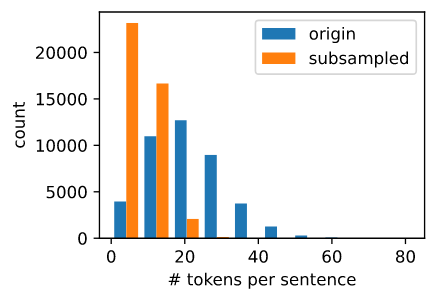
对于每个单独的tokens, 高频词的采样率 “the” 少于 1/20。
def compare_counts(token):
    return (f'# of "{token}": '
            f'before={sum([line.count(token) for line in sentences])}, '
            f'after={sum([line.count(token) for line in subsampled])}')

compare_counts('the')
’# of “the”: before=50770, after=1999’
但是低频词 “join” 被完全保留了下来。
compare_counts('join')
’# of “join”: before=45, after=45’
最后,我们将每个token映射到一个索引来构建语料库。
corpus = [vocab[line] for line in subsampled]
corpus[0:3]
[[], [71, 2115, 145, 274], [140, 5277, 3054, 1580, 95]]
Loading the Dataset
接下来,我们将带有token索引的语料库读入 data batches 中进行训练。
Extracting Central Target Words and Context Words
我们使用与中心目标词的距离不超过上下文窗口大小的词作为给定中心目标词的上下文词。下面的定义函数提取了所有中心目标词及其上下文词。它在整数1到最大窗口大小(最大上下文窗口)之间统一随机抽样一个整数作为上下文窗口大小。
def get_centers_and_contexts(corpus, max_window_size):
    """
    args:
        corpus(二重list) :  第一重list的元素是每个句子, 第二重list是每个句子里的单词对应的索引。

    return:
        centers(list) : 每个元素是语料库中每个词对应的索引, 每个词都会做中心词
        contexts(二重list): 每个中心词对应的上下文词的索引
    """
    centers, contexts = [], []
    for line in corpus:
        #--- 每个句子需要有至少两个词形成 “中心目标词 - 上下文词” 对 ---
        if len(line) < 2:
            continue
        #--- 一次性将所有中心词都加入了 ---
        centers += line
        for i in range(len(line)):
            #--- 上下文窗口的中心为i ---
            window_size = random.randint(1, max_window_size)
            indices = list(range(max(0, i - window_size), min(len(line), i + 1 + window_size)))

            #--- 将中心词从上下文词中排除掉 ---
            indices.remove(i)
            contexts.append([line[idx] for idx in indices])

    return centers, contexts
接下来,我们创建一个人工数据集,其中包含两个句子,分别为7和3个单词。假设最大上下文窗口为2,并打印所有中心目标单词及其上下文单词。
tiny_dataset = [list(range(7)), list(range(7, 10))]
print('dataset', tiny_dataset)
for center, context in zip(*get_centers_and_contexts(tiny_dataset, 2)):
    print('center', center, 'has contexts', context)
输出
dataset [[0, 1, 2, 3, 4, 5, 6], [7, 8, 9]]
center 0 has contexts [1, 2]
center 1 has contexts [0, 2]
center 2 has contexts [1, 3]
center 3 has contexts [1, 2, 4, 5]
center 4 has contexts [2, 3, 5, 6]
center 5 has contexts [3, 4, 6]
center 6 has contexts [5]
center 7 has contexts [8]
center 8 has contexts [7, 9]
center 9 has contexts [7, 8] \
我们将上下文窗口的最大大小设置为5。下面提取数据集中的所有中心目标词及其上下文词。
all_centers, all_contexts = get_centers_and_contexts(corpus, 5)
f'# center-context pairs: {len(all_centers)}'
’# center-context pairs: 353035’
Negative Sampling
我们使用负采样进行近似训练。对于一个中心和上下文 词对, 我们随机采样 $K$ 个噪声词 (在实验中$K = 5$)。 如Word2vec论文中所说, 噪声词采样的概率 $P(w)$ 为 $w$的词频和所有词的频率的比值的 0.75 次方 Mikolov et al., 2013b。
我们首先定义一个类根据采样权重采样候选值。 它缓存一个10000大小的随机数库, 而不是每次调用 random.choices。
class RandomGenerator:
    #--- 根据 n个 采样权重 采样 一个 [0, n] 的随机整数 ---
    def __init__(self, sampling_weights):
        self.population = list(range(len(sampling_weights)))
        self.sampling_weights = sampling_weights
        #--- candidates 用于存储每次采样的结果 ---
        self.candidates = []
        self.i = 0

    def draw(self):
        #--- 一次性就已经随机选了10000个数据,每次采样从这些数据中取 ---
        if self.i == len(self.candidates):
            #--- 权重决定population中各数据采样的频率 ---
            self.candidates = random.choices(self.population, self.sampling_weights, k=10000)
            self.i = 0
        self.i += 1
        return self.candidates[self.i - 1]

generator = RandomGenerator([2, 3, 4])
[generator.draw() for _ in range(10)]
输出:
[0, 2, 1, 2, 0, 2, 2, 0, 1, 2]
def get_negatives(all_contexts, corpus, K):
    """
    args:
        all_contexts(二重list) :  所有中心词对应的上下文词
        corpus : 语料库
        K : 采样 K 倍上下文词数量的噪声词

    return:
        all_negatives(二重list) : 每个中心词和上下文词对 的 噪声词
    """
    counter = d2l.count_corpus(corpus)
    #--- 噪声次采样的概率P(w) 为 w 的词频 与 所有词的频率的比值的0.75词方 ---
    sampling_weights = [counter[i]**0.75 for i in range(len(counter))]
    all_negatives, generator = [], RandomGenerator(sampling_weights)
    for contexts in all_contexts:
        negatives = []
        while len(negatives) < len(contexts) * K:
            neg = generator.draw()

            #--- 噪声词不可以是上下文词 ---
            if neg not in contexts:
                negatives.append(neg)
        all_negatives.append(negatives)
    return all_negatives


all_negatives = get_negatives(all_contexts, corpus, 5)
Reading into Batches
我们从数据集中提取所有中心目标词 all_centers, 以及每个中心目标词的上下文词 all_contexts 和 噪声词 all_negatives 。 我们将会读取它们到随机的 minibatches。
在数据的一个 minibatch, 第 $i^{th}$ 个样本包括一个中心词和它相关的 $n_i$ 个上下文词 以及 $m_i$ 个噪声词。因为每个样本的上下文窗口可能会不相同, 上下文词和噪声词的数量和 $n_i + m_i$ 将会不相同。 当我们构造一个minibatch时, 我们拼接每个样本的上下文词和噪声次, 并且补0直到拼接的长度相同, 也就是说, 所有拼接的长度是 $max_i$ $n_i + m_i$。 为了避免补0填充对损失函数计算带来的影响, 我们构造掩膜变量 masks, 其中每个元素都对应于上下文词和噪声词拼接起来后的每个元素, contexts_negatives. 当 context_negatives 变量中的一个元素被填充, 掩膜变量 masks 在相同位置的元素将会是0。 否则, 它的值是1。为了区分正样本和负样本, 我们也需要在 contexts_negatives 变量中区分上下文词和噪声词。 基于掩膜变量的构造, 我们仅需要创建一个与 contexts_negatives 变量形状相同的 标签变量 labels, 并且将和上下文词(正样本)相关的元素设置为1, 剩下的设置为0。
接下来, 我们将会实现 minibatch 读取函数 batchify。 它的 minibatch 输入数据 是一个长度为batch size的列表, 它们每个元素包含着中心目标词 center, 上下文词 context, 以及噪声词 negative. 这个函数返回我们所需要的格式的 minibatch 数据, 比如说, 它包含了掩膜变量。
def batchify(data):
    """
    args:
        data :  中心词 centers, 上下文词 contexts, 噪声词 negative_contexts

    return:
        centers(tensor) : shape (batch, 1)
        context_negatives(tensor) : 上下文词和噪声词拼接起来
        masks(tensor): 区别padding和context_negatives
        labels(tensor): 区别上下文词 和 噪声词 以及 padding
    """
    max_len = max(len(c) + len(n) for _, c, n in data)
    centers, contexts_negatives, masks, labels = [], [], [], []
    for center, context, negative in data:
        cur_len = len(context) + len(negative)
        centers += [center]
        contexts_negatives += [context + negative + [0] * (max_len - cur_len)]
        masks += [[1] * cur_len + [0] * (max_len - cur_len)]
        labels += [[1] * len(context) + [0] * (max_len - len(context))]
    return (torch.tensor(centers).reshape(-1, 1), torch.tensor(contexts_negatives), torch.tensor(masks), torch.tensor(labels))
构造两个简单样本:
x_1 = (1, [2, 2], [3, 3, 3, 3])
x_2 = (1, [2, 2, 2], [3, 3])
batch = batchify((x_1, x_2))

names = ['centers', 'contexts_negatives', 'masks', 'labels']
for name, data in zip(names, batch):
    print(name, '=', data)
输出
centers = tensor([[1],
        [1]])
contexts_negatives = tensor([[2, 2, 3, 3, 3, 3],
        [2, 2, 2, 3, 3, 0]])
masks = tensor([[1, 1, 1, 1, 1, 1],
        [1, 1, 1, 1, 1, 0]])
labels = tensor([[1, 1, 0, 0, 0, 0],
        [1, 1, 1, 0, 0, 0]])
我们使用刚才定义的 batchify 函数来指定 DataLoader 实例中的 minibatch 读取方法。
utting All Things Together
最后, 我们定义 load_data_ptb 函数读取 PTB 数据集 并且 返回数据迭代器。
def load_data_ptb(batch_size, max_window_size, num_noise_words):
    """
    args:
        batch_size : 批大小
        max_window_size : 最大窗大小
        num_noise_words : 噪声词数量

    return:
        data_iter : 数据迭代器
        vocab : 词典

    sentence -> vocab -> subsampled -> corpus
    """
    num_workers = d2l.get_dataloader_workers()
    sentences = read_ptb()
    #--- 构造语料库 ---
    vocab = d2l.Vocab(sentences, min_freq=10)
    #--- 二次采样 ---
    subsampled = subsampling(sentences, vocab)
    #--- 将词变成索引 ---
    corpus = [vocab[line] for line in subsampled]
    all_centers, all_contexts = get_centers_and_contexts(corpus, max_window_size)
    all_negatives = get_negatives(all_contexts, corpus, num_noise_words)

    #--- 构造数据集 ---
    class PTBDataset(torch.utils.data.Dataset):
        def __init__(self, centers, contexts, negatives):
            assert len(centers) ==  len(contexts) == len(negatives)
            self.centers = centers
            self.contexts = contexts
            self.negatives = negatives

        def __getitem__(self, index):
            return (self.centers[index], self.contexts[index], self.negatives[index])


        def __len__(self):
            return len(self.centers)

    dataset = PTBDataset(all_centers, all_contexts, all_negatives)

    data_iter = torch.utils.data.DataLoader(dataset, batch_size, shuffle=True, collate_fn=batchify, num_workers=num_workers)

    return data_iter, vocab
让我们打印数据迭代器的第一个minibatch。
data_iter, vocab = load_data_ptb(512, 5, 5)
for batch in data_iter:
    for name, data in zip(names, batch):
        print(name, 'shape:', data.shape)
    break
输出:
centers shape: torch.Size([512, 1])
contexts_negatives shape: torch.Size([512, 60])
masks shape: torch.Size([512, 60])
labels shape: torch.Size([512, 60])
Summary
- 二次采样的目的是尽量减少高频词对词嵌入模型训练的影响。
- 我们可以填充不同长度的样本,用相同长度的样本创建 minibatch,并使用mask变量来区分填充元素和非填充元素,这样只有非填充元素参与损失函数的计算。
Exercises
- 我们使用batchify函数在DataLoader实例中指定minibatch读取方法,并在第一批读取时打印每个变量的形状。如何计算这些形状呢?